FuturixAI
This guide explains what an on-premise LLM involves, when on-prem AI is worth the effort, when it isn't, and the part most teams underestimate.
5
places a model can run, from a public API to an air-gapped server room
The middle three are the private options
40 GB
of GPU memory for a 70-billion-parameter model at 4-bit
About 140 GB at 16-bit
20–30%
extra memory to allow for context and concurrent users
More for long documents
3 years
is the period to compare API spend with hardware and staff costs
At real usage, not pilot usage
What an on-premise LLM actually means
An on-premise LLM is a large language model that runs on servers your organisation owns or controls, so prompts, documents and answers never pass through a model provider's systems. In practice it's a range of options, and the right one depends on how sensitive the data is.
| Option | Where the model runs | Who can see your data | Typical fit |
|---|---|---|---|
| Public API | The provider's cloud | The provider, under its terms | Experiments, public or low-risk data |
| Private cloud | Your own account with a cloud provider | Your team; the cloud provider runs the hardware | Most enterprises with sensitive data |
| Dedicated or in-country region | A cloud data centre in a chosen country, often single-tenant | Your team; data stays in the country | Regulated sectors, data-residency rules, sovereign AI |
| On-premise | Your own data centre or server room | Only your team | Designs, client data, government and PSU work |
| Air-gapped | On-premise, with no internet connection | Only your team, physically isolated | Defence, critical infrastructure |
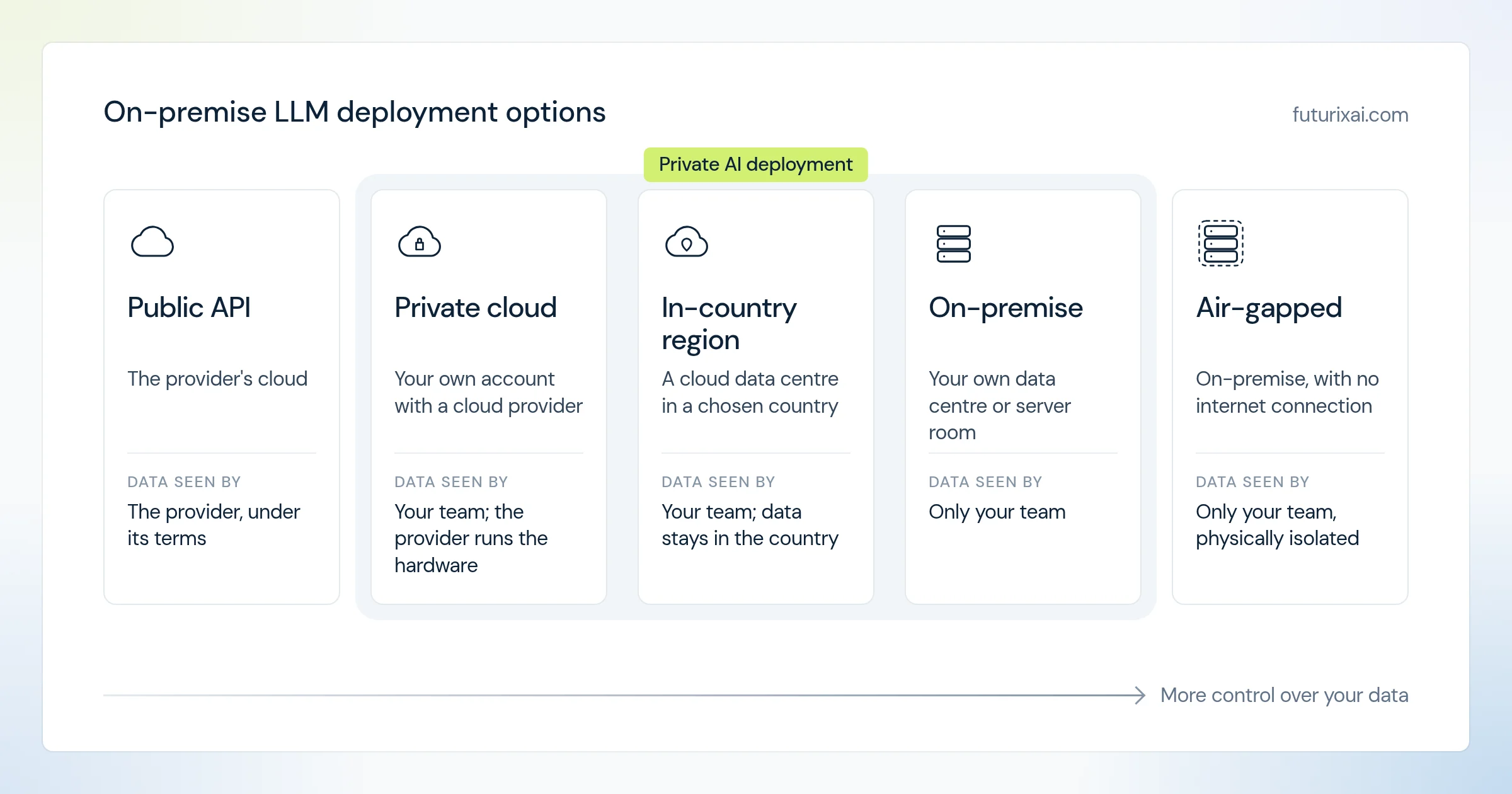
When people talk about a private AI deployment they usually mean one of the middle three. The in-country option is also what governments and regulators mean by sovereign AI: the data, the model and the people running it all stay within one country. The rest of this article uses on-premise to cover all three, because the decisions are much the same.
Five signs you need an on-premise LLM
1. Your most valuable data can't leave
For a manufacturer that's product designs and supplier rates. For an IT services firm it's client code and contracts; for an infrastructure company, cost estimates; for a bank, customer records. If the AI can't see this data it can't help with the work that matters most, and if your policy says the data can't go to a third party, the model has to come to the data.
2. Customers or regulators require it
Government and PSU contracts, defence work, banking and healthcare often come with clauses on where data is stored and processed, and some governments now expect sovereign AI, with the data and the model kept in the country. More enterprise customers now ask their suppliers how their AI tools handle data. With the model on your own infrastructure, those questionnaires get short answers.
3. Usage is high and predictable
Hosted models charge per token. That's cheap for a pilot and expensive when thousands of employees use AI every day, or when agents read every document that comes in. Past a certain volume, owning the hardware costs less than renting the model. Where that point lies depends on your own usage, so model it with your numbers before you buy anything.
Renting a model against owning the hardware
4. Work happens where the connection is poor
Plants and project sites often have weak internet or none. A model on a local server keeps working when the connection doesn't, and it answers faster.
5. You need control over the model itself
Hosted models change. Versions get retired and behaviour shifts after updates. If an AI step is part of an approved process, such as an AI approval workflow for purchase orders or a review of client contracts, you want to fix the model version, test it, and change it only when you decide to. You may also want to fine-tune it on your own documents.
When a hosted API is the better choice
Running AI in-house isn't automatically better. A hosted model makes more sense when:
- you're still finding out which use cases are worth it, and can prove value on data that isn't sensitive
- volumes are low or hard to predict
- the task needs the most capable models available, since the largest frontier models are only offered through APIs
- nobody on your team can run GPUs, patch inference servers and watch uptime, and you don't want to hire for it.
Open-weight models have closed much of the gap for document work such as search, extraction, summaries and drafting, but not for every task. Many enterprises end up with both: an in-house model for sensitive data and a hosted model for general work, behind one gateway that decides where each request goes.
What it takes to run on-prem AI
The model. Open-weight model families such as Llama, Qwen, Mistral and Gemma can be downloaded and run on your own servers, in sizes from a few billion parameters to several hundred billion. Licences differ, so check each one before commercial use.
The hardware. GPU memory is the main limit. As a rough rule, a model's weights need about 2 bytes per parameter at 16-bit precision, 1 byte at 8-bit and about half a byte at 4-bit. Running at lower precision, called quantisation, cuts memory use with a small loss in quality.
| Model size | 16-bit | 8-bit | 4-bit |
|---|---|---|---|
| 8 billion parameters | about 16 GB | about 8 GB | about 5 GB |
| 32 billion parameters | about 64 GB | about 32 GB | about 18 GB |
| 70 billion parameters | about 140 GB | about 70 GB | about 40 GB |
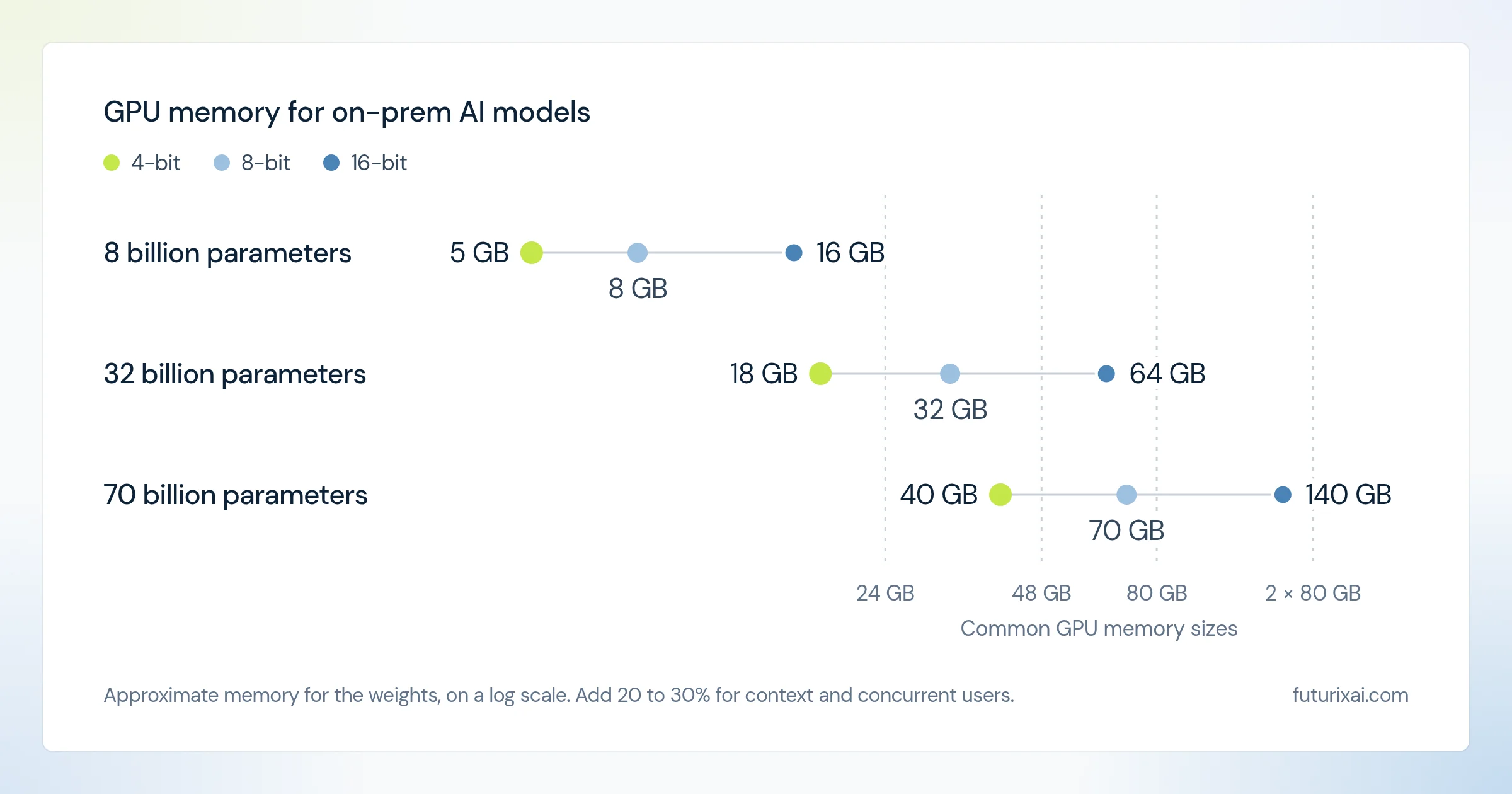
Add headroom for the context window and for the number of people using the model at once. Start with 20 to 30% extra, and more for long documents. In practice an 8B model fits on a single 24 to 48 GB GPU, while a 70B model needs one or two 80 GB data-centre GPUs, depending on precision.
The software. Besides the model you need an inference server (open-source options such as vLLM are common), a gateway that checks who is asking and logs every request, a retrieval layer that connects the model to your documents, and monitoring.
The people. Someone has to own it: at least one engineer who understands GPU infrastructure and model serving, backed by your IT and security teams.
The model is the easy part
Getting a model to answer questions on your own server takes days. Making it useful inside an enterprise takes much longer, for two reasons that have nothing to do with where it runs.
First, the model doesn't know your company. It doesn't know which projects are live, who owns which vendor relationship, which version of a policy or price list is current, or what your approval limits are. That knowledge is spread across the ERP, email, shared drives and people's heads. It has to be connected and kept up to date, which is the job of a context layer.
Second, the model has no idea who is allowed to see what. An in-house model that answers anyone's question from any document has simply moved your data-leak risk inside the firewall. Every answer and every action has to respect the same permissions and approvals your people work under, and leave an audit trail.
That's why we treat deployment as one decision among several. Running the model in-house keeps data away from outside parties. Context and governance decide whether the system is useful, and safe, inside the company.
Four questions to help you decide
1
DataWhich data will the AI need to see, and is any of it barred from leaving your infrastructure by policy, contract or law? If so, start in-house or in a private cloud for those use cases.2
VolumeHow many requests a day do you expect a year from now, not during the pilot? Compare API costs at that volume with hardware and staff costs over three years.3
SitesDo any of your users work at sites with poor connectivity?4
OwnershipWho will run it? If nobody, choose a managed private AI deployment, where a vendor operates the system inside your environment.If the answer to the first three is no, start with a hosted API and come back to the question as usage grows.
How FuturixAI deploys
FuturixAI builds the context, governance and execution infrastructure for AI-native enterprises, which we call Enterprise Intelligence Infrastructure. It's an enterprise AI platform built to run where your data is: in our cloud, in your own cloud account, or on your own servers. The context layer, permissions and audit trail come with every option, so moving from a hosted pilot to on-prem AI doesn't mean starting again. Applications such as ZeroDesk, UniCRM and TenderLens run on the same layer.
To see how this applies in your sector, read about AI for manufacturing, AI for IT services, AI for EPC and AI for government.
If you're weighing an in-house deployment, talk to our team about your data, volumes and sites. For work built around your own workflows, see custom AI solutions.
Frequently asked questions
Is an on-premise LLM as good as a hosted model?
For document-heavy work such as search, summaries, extraction and drafting, current open-weight models in the 30 to 70 billion parameter range do well. The largest hosted models still lead on the hardest reasoning tasks, which is why many enterprises use both.
How much does an on-premise LLM cost?
The main costs are GPUs, power and cooling, and the engineer who runs the system. Compare them with your expected API spend over three years at real usage, not pilot usage.
Is a private cloud the same as on-premise?
Not exactly. In a private cloud the provider runs the hardware, but your data stays inside your own account. For most companies that kind of private AI deployment is enough control without owning servers. Some contracts specifically require on-premise or in-country hosting, so check yours.
What is sovereign AI?
Sovereign AI means the data, the models and the people operating them stay within one country and under local control, rather than with a foreign provider. In practice that means an in-country cloud region or on-premise servers. An on-premise LLM is one way to get there.
Can we start in the cloud and move on-premise later?
Yes, as long as the platform runs the same way in both places. Avoid building workflows that depend on one provider's proprietary features.